 Documentation
Use Cases
Use Case 1 - Simple Cloud Storage
Onedata can be used as a straightforward alternative to traditional cloud storage services.
- No buckets or API keys needed. You work with files and folders just like on your local computer.
- Multiple access options. Use the web portal for quick uploads, or mount your Space as a local directory with Oneclient.
- Multiple backend support. Onedata can manage data stored on POSIX file systems, NFS, S3, Ceph RADOS, HTTP/HTTPS, and XRootD - all through a single unified interface.
- Easier for non-technical users. If you just need to store, share, and manage files without learning S3 concepts, Onedata provides a familiar experience.
When to choose this: Small teams, personal backups, or any workflow where a conventional file system feel is preferred over object storage semantics.
Use Case 2 - HPC Data Locality Optimization
One of Onedata’s biggest strengths is the ability to move data close to where compute happens, reducing latency and avoiding bandwidth bottlenecks.
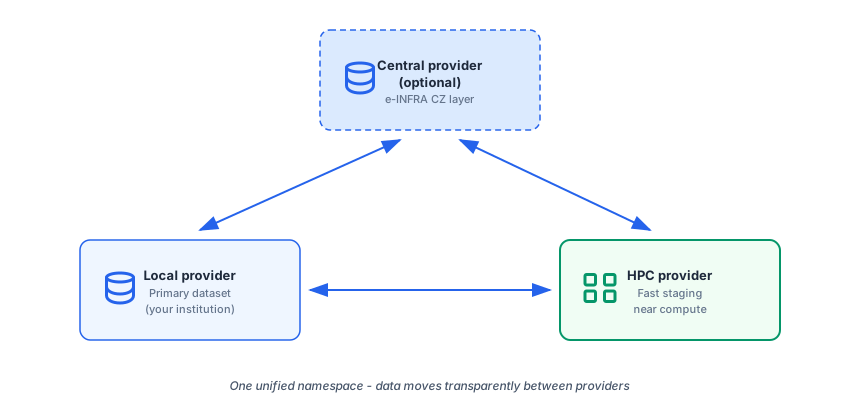
- Store primary data in your home Onedata provider (e.g., at your home institution).
- Replicate or transfer the dataset to a provider physically close to the HPC cluster you want to use - often on faster storage tiers.
- Run your compute job with high-throughput, low-latency access to the data.
- Move results back to your home provider for long-term storage or further analysis.
Benefit: You do not need to manually copy files with
scporrsync. Onedata handles the transfer between providers, and you access everything through the same unified path.
Use Case 3 - Cross-Institution Collaboration
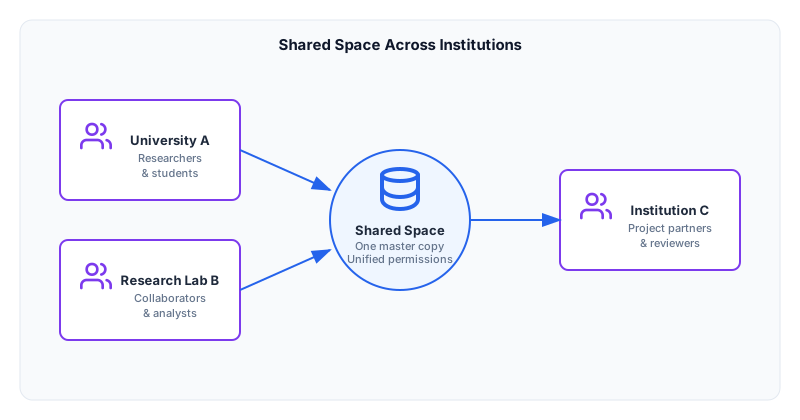
Large-scale research projects often span multiple universities or labs across regions. Onedata supports these consortia by providing a single, long-term shared Space as the project backbone.
- Single shared Space. Create one Space for the project and connect all partner institutions.
- Unified view. Every partner sees the same files and folder structure, regardless of which provider they connect through.
- Centralized permissions. Project admins manage access via groups and roles, avoiding scattered link sharing or manual data transfers.
Benefit: Eliminates version confusion and reduces storage waste. There is only one master copy of the data, while each site can hold replicas for faster local access if needed.
Use Case 4 - Easy Data Sharing
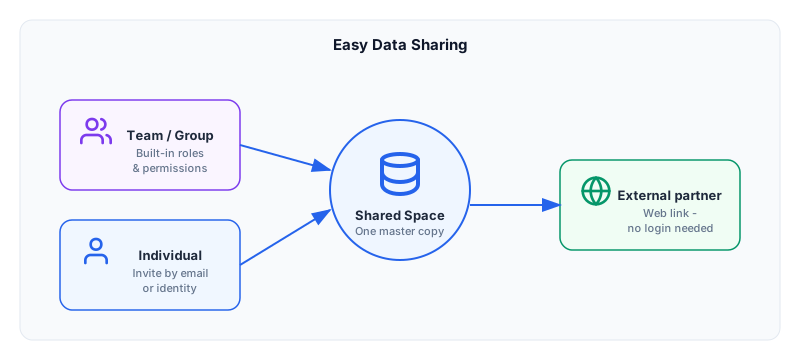
Onedata makes it simple to share data with colleagues, collaborators, or external partners without creating duplicates or managing complex infrastructure.
Team and group sharing
- Share a Space or a specific folder with a research group or lab.
- Use built-in groups and roles so permissions stay organized as the team grows.
- Everyone works with the same files in real time.
Individual sharing
- Invite specific users by identity or email.
- Grant read-only or read-write access per file or folder.
- Revoke access instantly when it is no longer needed.
Cross-community and ad-hoc sharing
- Share datasets instantly with external partners via a web link.
- Recipients access files through the browser - no account or installation required.
- Ideal for peer review, conferences, or one-off data exchanges.
When to choose this: Whenever you need to grant someone access to your data quickly, whether they are a teammate, a reviewer, or an external collaborator.